AI interview screening for hiring teams
Every candidate gets the same first round.
InterviewSparrow is an AI interviewer that screens every candidate against your job description — spoken, screen shared, with a live exercise — then hands your team a recommendation and the evidence it was drawn from.
Sign up with your work email, set up your organisation, buy interview credits and invite your first candidate. No calls, no sales dance.
One rubric per role · every score quoted from the transcript · session conditions in the same report, never in the score
How it works
AI interview screening, from job description to recommendation
Add the job
Paste the job description or upload it as a PDF, Word file or plain text, and set how long its interviews run. InterviewSparrow reads the role and its requirements from the JD, so a job is set up once and every candidate on it is interviewed against the same thing.
Invite a candidate
Add their name, email and resume. They get a single-use invite link, create their own InterviewSparrow account, and take the interview when it suits them.
Read the recommendation
When the interview finishes, the report appears in your portal: a recommendation, seven scored dimensions, the quotes behind each score, and the full transcript.
The interview runs on a laptop or desktop, webcam on and the whole screen shared. Want an extra pair of eyes? Add the candidate’s phone as an optional second camera, set for your organisation, for a job or on each invitation, at 1 credit extra per interview. The interview itself does not run on a phone.
Your candidates meet the same AI interviewer that people use to practise on InterviewSparrow, and are scored on the same seven dimensions. Read how the AI interview works and what it scores.
The report
A recommendation you can audit
How the recommendation is calculated
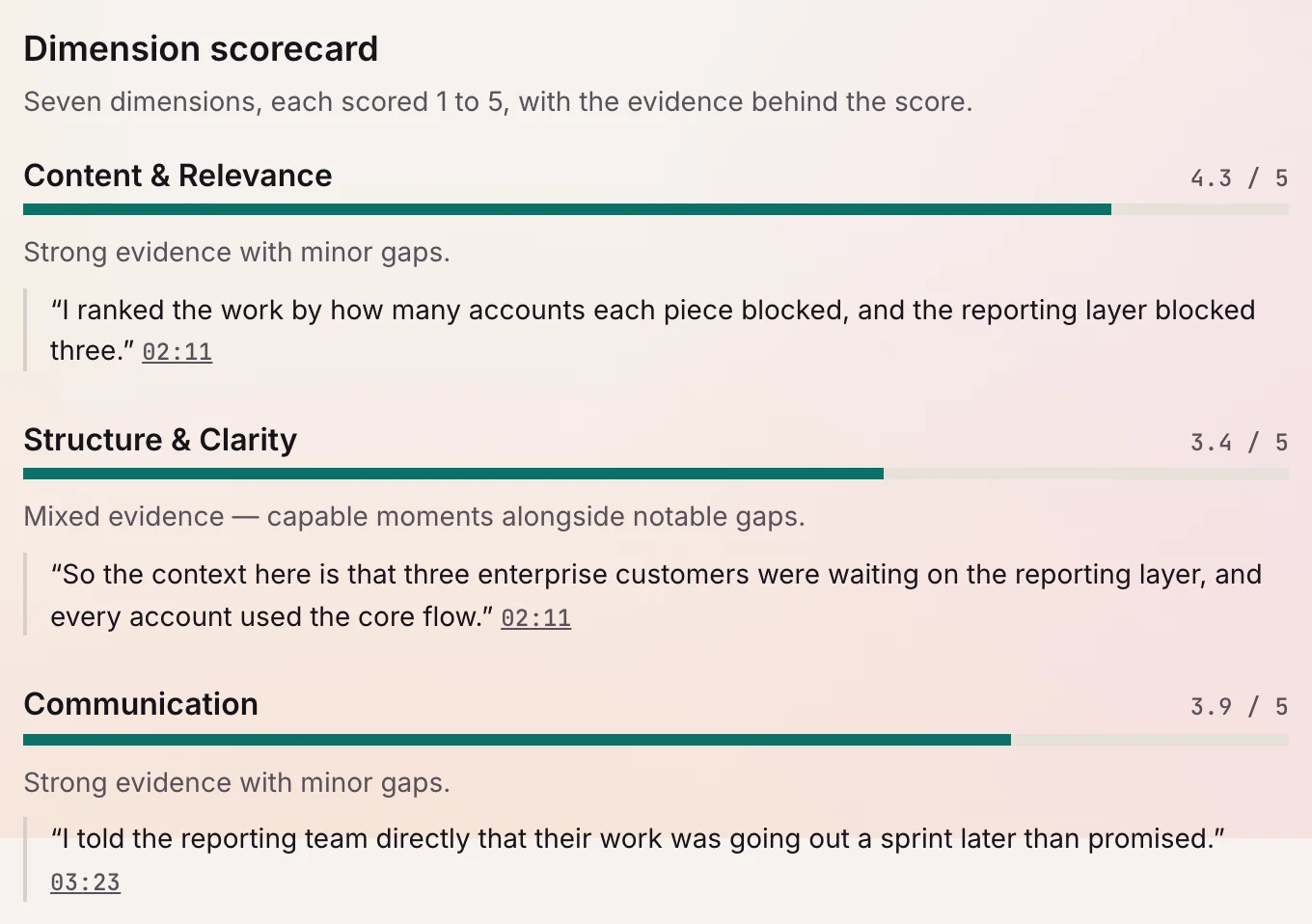
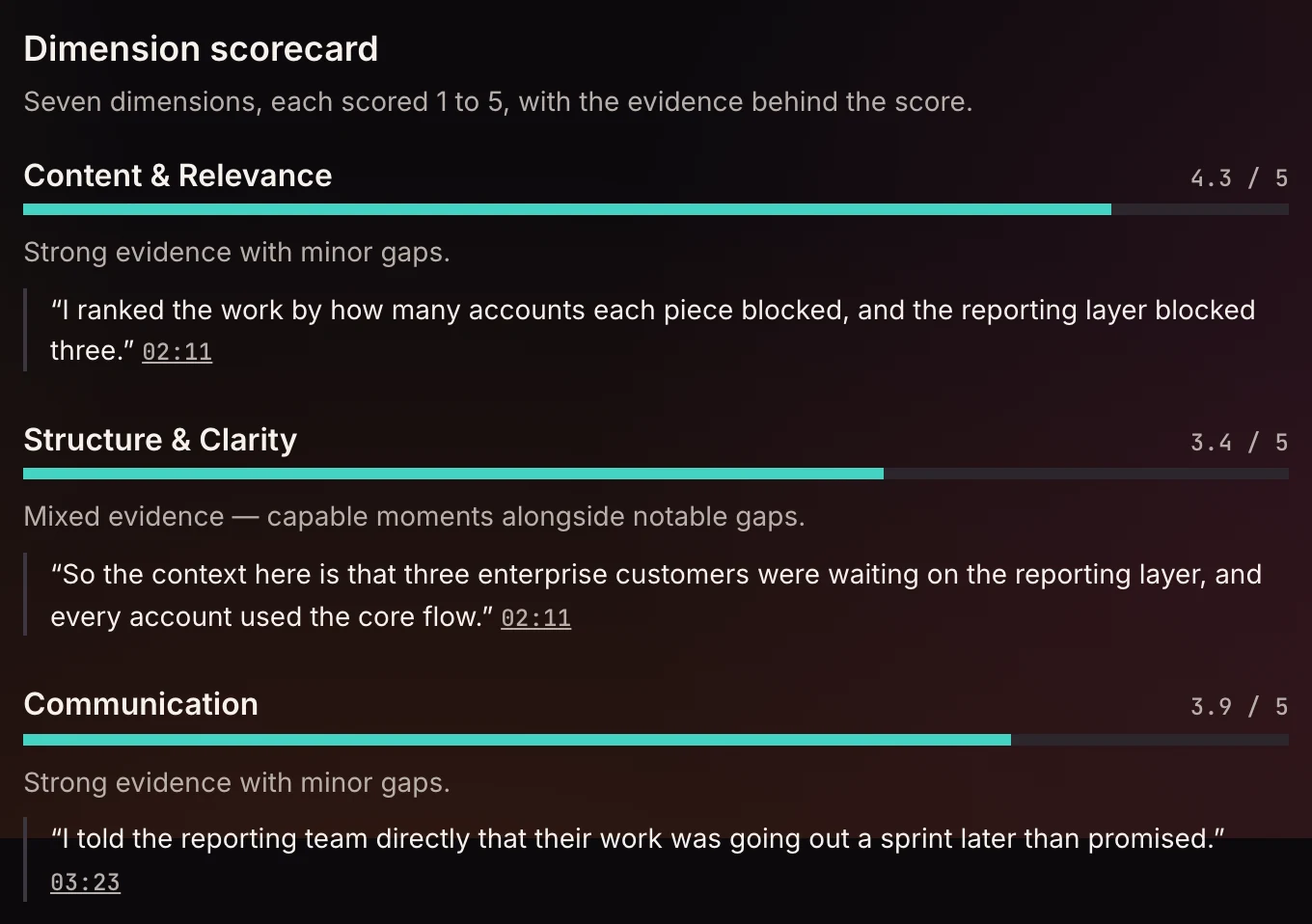
Every candidate is scored from 1 to 5 on the same seven dimensions, and each score is tied to quotes from their answers. The recommendation is the plain average of the seven, every dimension weighted equally, mapped to one of four levels: yes, weak yes, weak no or no.
The seven dimensions
- Content and relevance
- Structure and clarity
- Communication
- Behavioral signals
- Role-specific fit
- Consistency with the resume
- Applied execution
The report shows each dimension score, the average, the level it falls in and the formula that produced it, so your team can check the arithmetic.
A verdict, computed rather than judged
No model re-judges the result: the level is the arithmetic, and the report shows it. It supports your team’s decision; it is not the decision.Evidence you can check
Each dimension carries quotes from the candidate’s own answers, timestamped and linked to the moment in the transcript they came from.A resume cross-check
Claims on the resume and requirements of the role are marked substantiated, contradicted or not discussed against what the candidate actually said in the interview.Session conditions, in the same report
Screen and webcam capture, and anything the session monitor noticed, sit in their own section of the report, between the scores and the transcript. Nothing there adjusts a score or rejects a candidate. What the candidate produced on screen is a separate matter: it is the work the round asked for, so it is read against the rubric and scored into applied execution.The whole conversation
The full transcript sits in the report, so any quote can be read back in the context it came from.A stated scope
The interview measures job knowledge, applied skills and communication against the job description. It does not measure personality or culture fit, and it does not certify integrity.
Your team
Three roles, one shared credit pool
Admins, recruiters and viewers
Admins manage the team, settings and purchase history. Recruiters run jobs, candidates and invites, viewers read reports — and anyone can buy credits.Credits belong to the organisation
Interviews draw from one credit pool owned by the organisation, not a person — and anyone on the team can top it up.
Candidate data
Where candidate data is kept, and who sees it
The points below say where candidate data is stored and processed, how long it is kept, and who in your organisation can see it.
Candidates know what is shared
The invite names your organisation, says the session is monitored — and, where you add the phone camera, that the candidate’s phone is a second camera — and says the results go to you. The candidate consents to that before the interview starts.Where it is stored and processed
The Privacy Policy says where your account and your candidates’ transcripts, reports and recordings are stored, and names every provider that processes them, including those for live voice, screen and webcam images, and AI analysis.The interview video is deleted after 30 days
An interview your organisation sets up records the candidate’s screen and camera as one video, with both voices. That video, and any frames the session monitor flags, are deleted after 30 days. The conversation’s audio is kept separately, with the candidate’s own account rather than your organisation’s, and is not part of the 30-day deletion.Snapshots of on-screen work
Still snapshots of the work a candidate produces on screen, such as a diagram or code, are shown to your team with the report. They are kept until the candidate deletes their InterviewSparrow account or asks us to remove them, or your organisation deletes its workspace.Who can see it
Everyone in your organisation, whether admin, recruiter or viewer, can open a candidate’s report and watch the recording while it is kept.
What InterviewSparrow collects, who processes it, how long it is kept and the rights candidates have are set out in the Privacy Policy, and interviews an employer sets up are covered by the Terms of Service.
Price
Pay by the credit
$1.20 a credit · a 30-minute interview takes 10 ($12) · the full hour takes 20 ($24)
Bigger packs, smaller price per credit: $1.12 from 150 credits, then $1.04 from 300, then $0.96 from 600.
Your employer portal shows the exact price before you pay. See every credit pack